
Recap: What is a Service
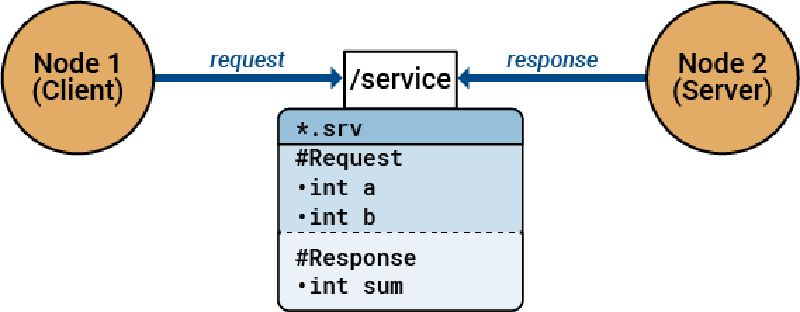
Remember from the first part of this series, services are a node that allows you to give and input to get the desired output. If we want to add values, we can make a service that takes two numbers, sums them, and responds with the sum. Remember, they don’t publish continuously. They only respond when the service is called.
All good? Time to serve some nodes!
Format of this and future articles:
It is important to understand how this article will go. We will go through an example together. I believe that knowledge can only be attained through practical examples.
Task 1
Take in 2 numbers and respond with the product of those numbers.
Process
A node will programmatically call the service and we must do the following:
- Get inputs
- Compute product
- Respond via topic the product
Programming
Making a ROS Package
First, we have to make a ROS package which will be our node. That node will contain the code to make a topic and publish the message. There is a built-in command to do this using catkin.
First, though, navigate to the workspace:
|
|
NOTE: You MUST be in src.
Then run this:
|
|
Yikes! That is a lot so let me break it down.
- First, we have
catkin_create_pkgwhich is the base command. - Next comes the name of the package, in this case
basic_ros_service. This can be anything. - Then, we add all the dependencies of the package. Here, we have 3:
std_msgsrospyroscppstd_msgsis a ROS package that contains a bunch of data types likeFloat64,String,Int64, and more!rospyis a library that contains methods for using ROS with Python. This is what we will use today.roscppis a library that contains methods for using ROS with C++. We will NOT use this today.rosdistrostates the distribution of ROS we are using. In this case, it is ROS “noetic”. (This is optional as long as you have sourced your ROS environment)- Note: Services have additional requirements that we will manually add later!
Everything that is mandatory to install has been done. Now on to the optional stuff.
- These parts are really self-explanatory. It includes the license, description, author, maintainer, and version.
- You don’t need this but it is a good practice to keep.
Now, list the files in the directory. You will see this:
|
|
Go to basic_ros_service and list again.
|
|
CMakeLists.txt— contains all the info catkin needs to compile the project. It contains a list of the libraries, files, packages, and other stuff it has to compile. We will come back to it later.package.xml— contains info like package owner, description, version, maintainer, license, etc. We filled some of it earlier. The only important thing in it is the dependencies definitions. Our command already did this previously.
It looks like this:
|
|
That bottom part with the buildtool_depend and build_depend statements define the important libraries.
First, we must make a folder in our package called srv/. This will hold our custom service. In it make a file called Product.srv. Put this in it:
|
|
The first 2 float statements are the input. Then we put --- to show ROS that we are now defining the output. Lastly, we have the output. This allows us to define custom services with custom inputs and outputs.
Navigate to the src within that. Now you should be in USERNAME/catkin_ws/src/PACKAGE_NAME/src.
Here is where we put all of our code! Make a file called ProductServer.py. Again, names aren’t super important.
Here is your file structure right now:
|
|
Now let’s start on the code itself. First, you have to import the rospy and std_msgs.
|
|
Now we make the function that serves the clients.
|
|
And then we can run it with this:
|
|
IMPORTANT: You much make sure that your Python file is executable. sudo chmod +x ProductServer.py
Go the CMakeLists.txt and add our python script to the file. This will make sure that catkin will compile it.
|
|
Then, we need to make our SRV file that also needs to be compiled. Add the following lines to your CMakeLists.txt:
|
|
Also, add a dependency to the find_package section:
|
|
We also need to add this dependency to our package.xml. Add the following lines next to all your other depend statements:
|
|
Now go back to catkin_ws. Run catkin_make. Source the directory source devel/setup.bash.
If it compiles, the hardest part is over!
Running it
Start roscore: roscore. Now, start serving: rosrun basic_ros_service ProductServer.py.
Check the node using rosnode list. We will see our basic_ros_service service.
Check the service using rosservice list. We will see our basic_ros_service service and some logger services. Let us try calling our service using CLI.
|
|
Hint: If you forget the format of the command hit TAB twice and it will auto-populate the command.
We will see our result of 4.0.
Receive Data Programmatically
Import libraries:
|
|
Define client function and make the appropriate call:
|
|
Make the usage helper in case we forget how to use it:
|
|
Run the functions from the CLI arguments:
|
|
Again, remember to change the permissions of the file. And run it the same way as the publisher.
To run it, do rosrun basic_ros_service ProductClient.py 2 2.
Conclusion
In this article, you learned how to make a Service Server and Client. You also learned how to make custom messages in the form of service. Lastly, you dived a little deeper into the CMakeLists and the message_generation library. If you encounter any errors or have any questions, leave a comment. I will try my best to help you. I hope you enjoyed it. If there is a particular topic in ROS that you want me to cover, let me know in the comments as well!